 Free Android app · by AIVEXA
Miftah — Prayer Times, Azan, Quran & Namaz-Wudu guide
Accurate namaz times for your city, a reminder before every prayer, the Azan at prayer time and an Iqamah alert for jamaat. Read the Quran with translation and tafseer, complete hadith books, learn wudu and namaz step by step — in English, हिन्दी, اردو, বাংলা, മലയാളം, العربية and Bahasa Indonesia.
What is Miftah?
Miftah is a free, privacy-first Android app by AIVEXA LLP for Muslims: accurate offline prayer (namaz) times, Azan and Iqamah notifications, a Qibla compass, the Holy Quran with word-by-word meanings, your choice of translator and tafseer (Ibn Kathir, Ma'ariful Qur'an, Bayan-ul-Qur'an and more), complete hadith books (Bukhari, Muslim, Abu Dawud, Tirmidhi, Nasa'i, Ibn Majah, Muwatta), Qur'an and hadith search, a step-by-step Namaz & Wudu guide with diagrams, a Daily Sunnah checklist, a Khatam planner with daily portions and streaks, a Hifz (Quran memorisation) mode with ayah repeat and hidden text, an Islamic Hijri calendar with sunnah-fasting and Jumu'ah reminders, a Kids tab with the full Noorani Qaida (13 lessons from letters to reading the Qur'an, with Qur'an words recited by a qari), the six kalimas and a quiz, sunnah reminders (morning/evening azkar, Surah al-Mulk at night, bedtime du'as, Surah al-Kahf and Jumu'ah), du'as after every salah, du'as for how you feel, the Seerah of the Prophet ﷺ in 25 chapters, Qur'an auto-scroll with adjustable speed, Understanding Qur'an (learn the 267 most frequent Qur'anic words five a day, with quizzes, practice on real ayat and 10 simple grammar lessons), Makkah & Madinah live streams with local prayer times, the Madinah Mushaf (KFGQPC) script, a customisable Home screen, a salah tracker, and a gentle app blocker that pauses distracting apps during prayer time. Every feature is free; an optional one-time Hadiya (gift) supports the app and Qur'an education. Available in English, Hindi, Urdu, Bangla, Malayalam, Arabic and Indonesian.
Most prayer apps stop at a time table. Miftah (Arabic for “the key”) also helps you actually pray on time: it reminds you before each salah, calls the Azan, reminds you again at Iqamah, and — if you choose — pauses Instagram, YouTube or games during the prayer window, showing an ayah, hadith or du'a instead.
Every feature is free. An optional one-time Hadiya (gift) supports the app, and 20% of it goes to Qur'an education at a hifz madrasa — with the amounts shown openly inside the app.
See Miftah in action
Everything for your daily prayers
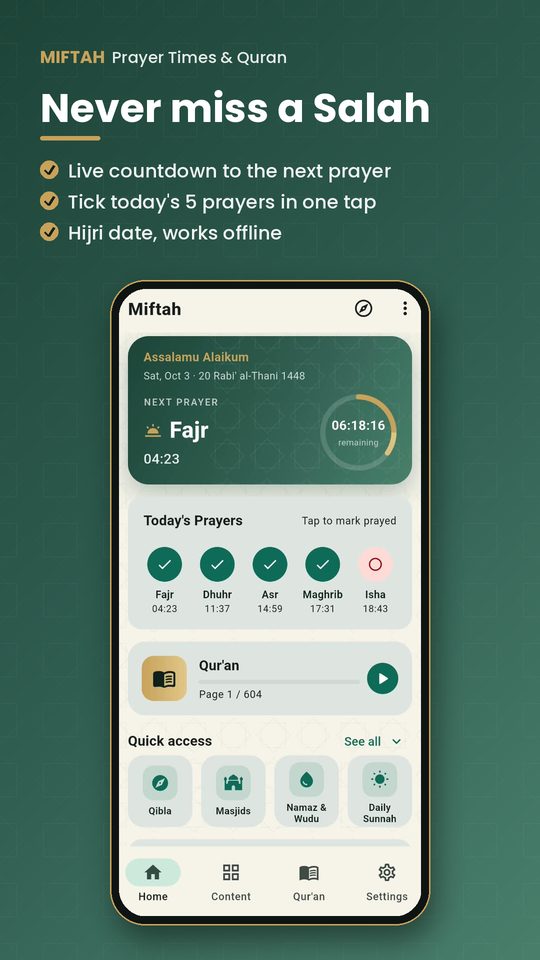
Accurate prayer times
GPS-based Fajr, Dhuhr, Asr, Maghrib and Isha times that work offline, with all major calculation methods (MWL, Karachi, Umm al-Qura, ISNA, Egypt and more) and Hanafi or Shafi'i Asr. Adjust any time to match your local masjid.
Azan, Iqamah & before-prayer alerts
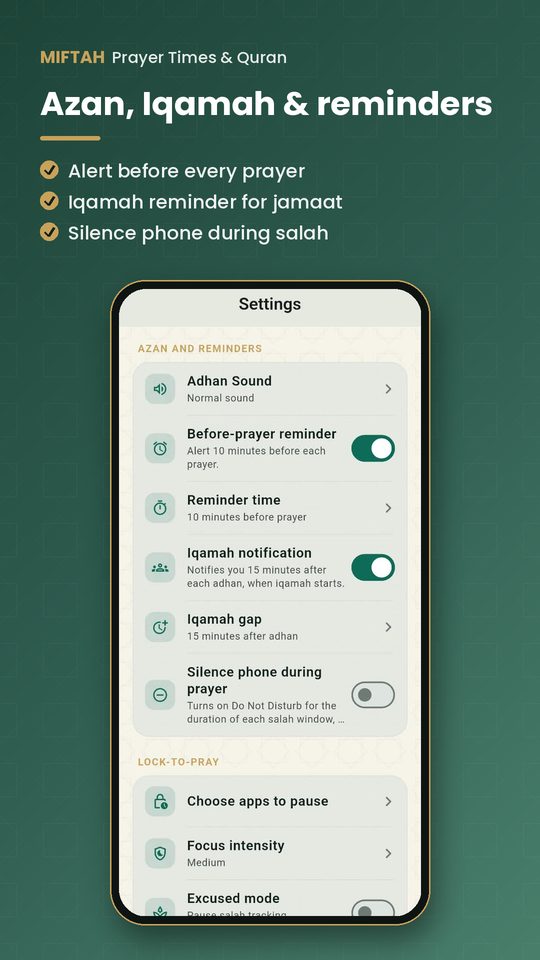
A reminder a few minutes before each prayer, the Azan notification at prayer time with a normal or “Allahu Akbar” sound, and an Iqamah reminder for congregation — scheduled a week ahead so you never miss one.
Holy Quran
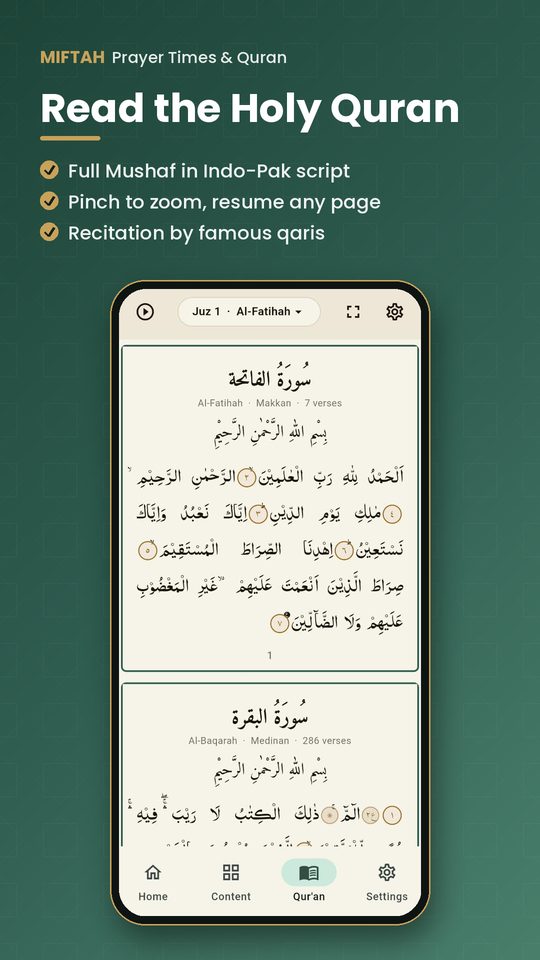
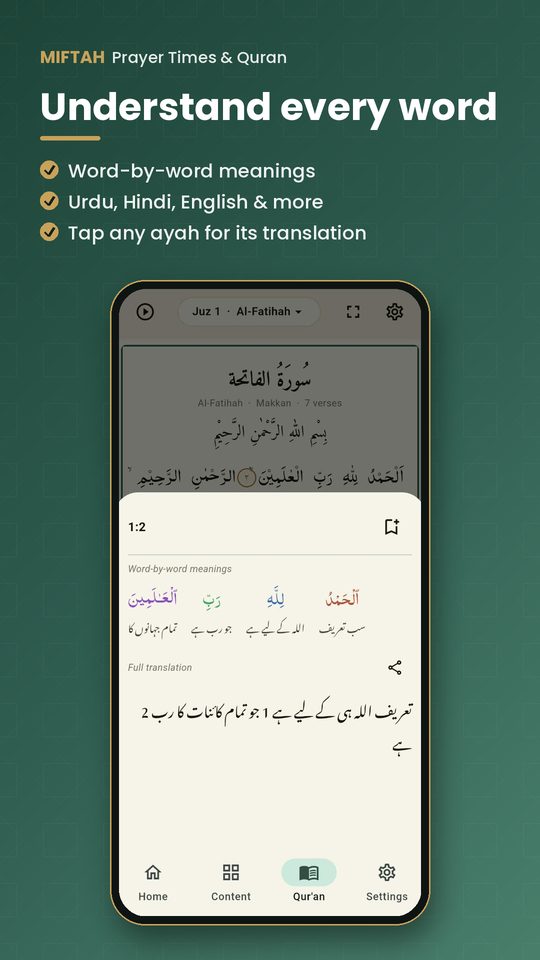
Full Mushaf in Indo-Pak, Madinah Mushaf (KFGQPC Uthmanic Hafs) or simple Uthmani script with pinch-to-zoom, right in the bottom bar. Word-by-word meanings and full translation in Urdu (Nastaliq), Hindi, English, Arabic and Indonesian, famous reciters, bookmarks and surah search. Resume from your last page in one tap.
Complete hadith books & tafseer
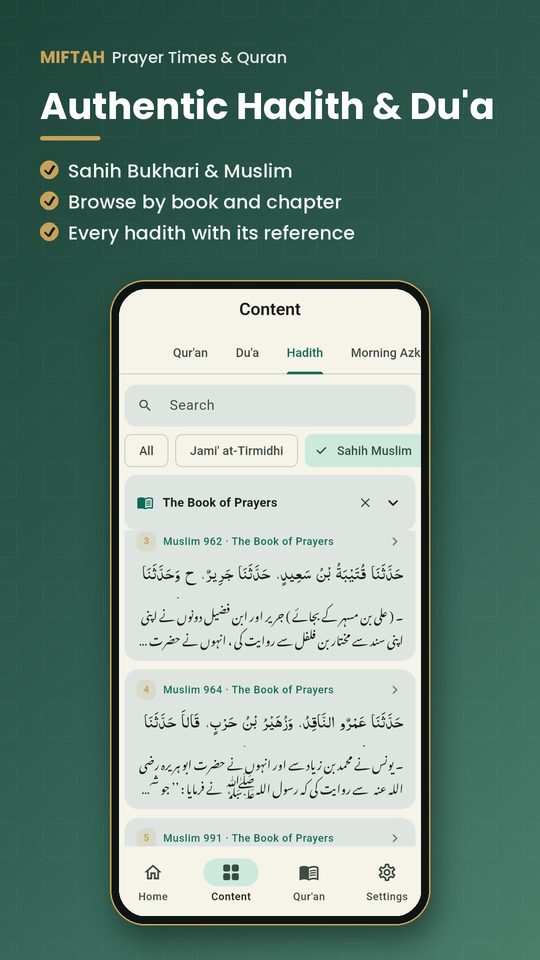
A Books tab with Sahih al-Bukhari, Sahih Muslim, Sunan Abu Dawud, Jami' at-Tirmidhi, Sunan an-Nasa'i, Sunan Ibn Majah, Muwatta Malik and 40-hadith collections — every chapter with full Arabic, translation, number and grade — plus tafseer books like Ibn Kathir, Ma'ariful Qur'an, Bayan-ul-Qur'an, Tazkirul Qur'an and Fi Zilal al-Qur'an.
Search Qur'an & hadith
Type a word like namaz, roza, sabr or jannat (English, Arabic or Roman Hindi/Urdu) to find every ayah or hadith about it, or jump straight to an ayah (2:255) or a mushaf page.
Listen to everything
Every du'a, hadith, azkar and guide step can be read aloud — the Arabic first, then the translation in your language. Qur'an recitation by famous qaris, and your choice of Qur'an translator in any language.
Namaz & Wudu guide
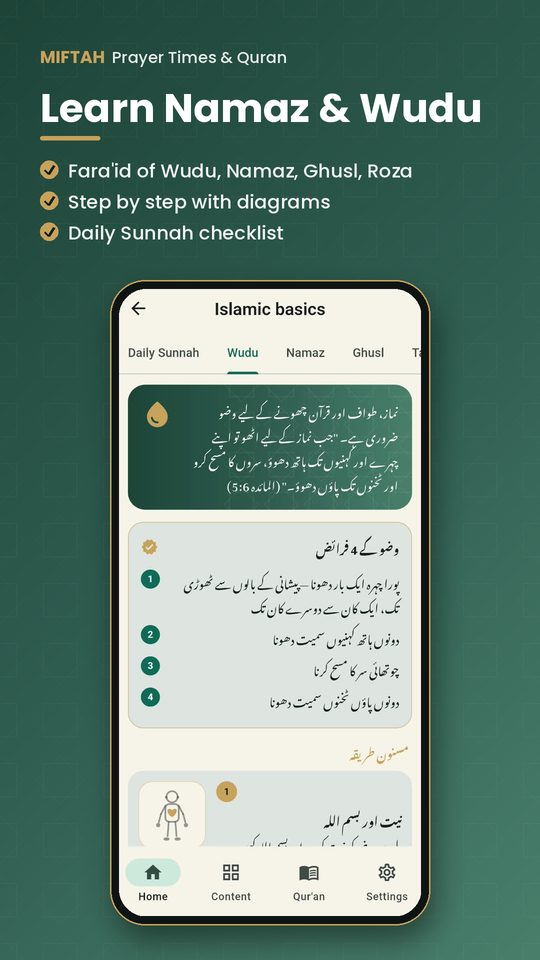
The fara'id and step-by-step method of Wudu, Namaz, Ghusl, Tayammum and Roza, with a small diagram for every step and salah posture, the du'a of each step with its reference, what breaks wudu and the fast, and the rak'ahs of the five prayers.
Daily Sunnah checklist
A daily checklist of sunnah habits — miswak, Bismillah, spreading salam, the 12 sunnah rak'ahs, tasbih after salah, sleeping du'as, Friday sunnahs and more — each with its hadith reference. It resets every day.
Hindi, Urdu, Bangla & Malayalam
Use the app in English, Hindi, Urdu, Bangla, Malayalam, Arabic or Indonesian, with Qur'an translations in each language — e.g. Azizul Haque al-Umari (Hindi), Junagarhi and Maududi (Urdu), Taisirul Quran (Bangla), Abdul Hameed & Kunhi Mohammed (Malayalam).
Quran recitation check
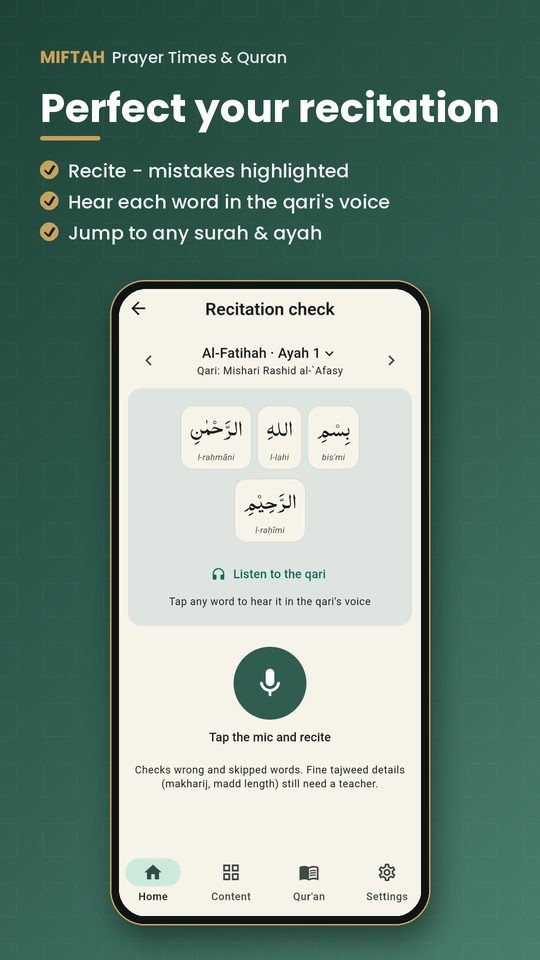
Recite an ayah and Miftah checks it word by word — wrong or skipped words are highlighted, and you hear each one corrected in your chosen qari's voice. Jump to any surah and ayah.
Lock-to-Pray app blocker
Pick apps like social media, games or YouTube to pause during each salah window. Miftah shows an ayah, hadith or du'a instead and lets you continue after you pray — with gentle, medium or strict modes and an emergency bypass.
Salah tracker & streaks
Tick each prayer as prayed from the home screen, build a daily streak, see a weekly chart, and keep a qada list of missed prayers. Excused mode for women with no streak penalty.
Qibla compass & masjid finder
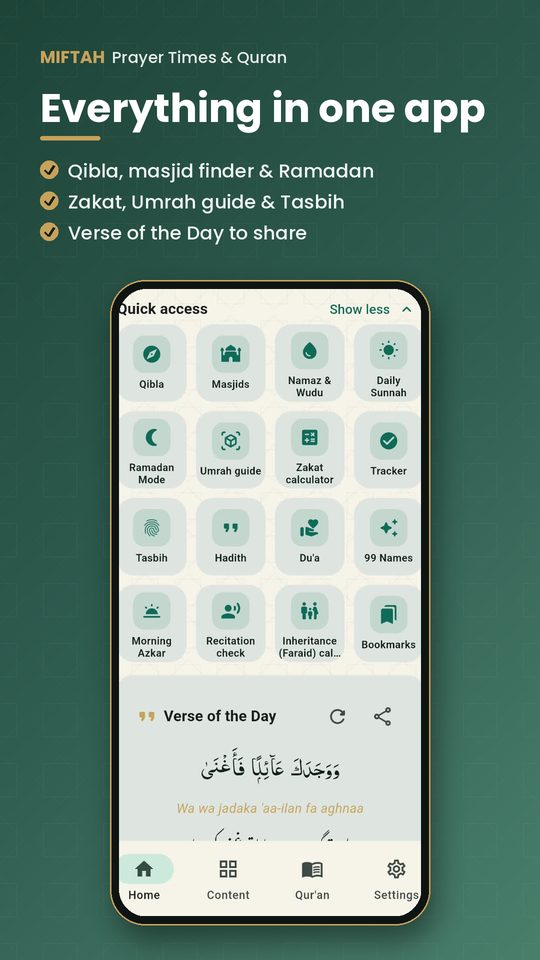
Find the Qibla with a compass or the AR camera view, and find nearby masjids with directions in Google Maps.
Du'a, hadith & dhikr
400 authentic hadith from Sahih Bukhari and Sahih Muslim — browse by book and chapter, each with its source and number — plus du'as, morning and evening azkar, the 99 Names of Allah and a digital tasbih counter.
Ramadan & Islamic tools
Ramadan mode with Sehri and Iftar times, Hijri date, an Umrah guide with authentic du'as, a Zakat calculator and an Islamic inheritance (Faraid) calculator.
Khatam planner & streak
Choose 7, 30, 40, 60 days or your own target and Miftah splits the 604 pages into a daily portion. Pages count automatically as you read the mushaf (or mark a portion read from a printed Quran), with a streak, an on-track/behind indicator, a daily reminder at your chosen time and a du'a when you finish the khatam.
Hifz mode (Quran memorisation)
Pick any surah and memorise it: hide the text or show only the first word to test yourself, repeat each ayah 1–20 times and the whole range in a loop with your chosen qari, tick ayahs as memorised, and see which surahs are due for revision. Short surahs (Juz 'Amma) are listed first.
Islamic calendar & sunnah fasting reminders
A Hijri month view with Islamic days and sunnah fasts marked — Ayyam al-Bid (13–15), Monday & Thursday, Arafah, Ashura, six of Shawwal, Ramadan, the odd nights of the last ten, both Eids — each with its hadith reference. Reminders the evening before, a Friday Surah al-Kahf & durood reminder, and a ±2 day Hijri adjustment for local moon sighting.
Kids tab: full Noorani Qaida
13 Noorani Qaida lessons from single letters to reading the Qur'an — joined letters, huroof muqatta'at, harakat, tanween, khari zabar, madd, leen, sukoon, tashdeed — with real Qur'an words recited by a qari (word-by-word audio), then Al-Fatihah and short surahs word by word. Plus the six kalimas with meaning (Kalima Tayyibah in a qari's voice) and a 12-question quiz.
Sunnah reminders & 'For you today'
Gentle reminders for morning and evening azkar, daily Qur'an reading, Surah al-Mulk at night, the bedtime sunnahs (Ayat al-Kursi, last two ayahs of al-Baqarah, the three Quls, tasbih), and Surah al-Kahf and Jumu'ah on Friday. The Home screen shows what is due right now — one tap opens the exact page.
Du'as after salah & du'as for how you feel
The authentic adhkar after every fard prayer with a tap counter (istighfar, Allahumma antas-salam, tasbih 33-33-33, Ayat al-Kursi, the three Quls…), and du'as for 12 moods — anxious, sad, sick, angry, grateful, before exams and more — with Qur'anic du'as recited by a qari.
Seerah of the Prophet ﷺ
The life of the Prophet Muhammad ﷺ in 25 short chapters — from his birth in Makkah to his passing in Madinah — with Qur'an and hadith references, in English, Hindi and Urdu, and read aloud.
Qur'an reader: auto-scroll, speed & repeat
Hands-free auto-scroll at your own speed (slow for learners, fast for huffaz), recitation speed 0.75×–1.5×, repeat each ayah up to 10 times, pause any time, the page follows the qari and continues to the next surah, search surahs by name or number, and bookmarks that open with the ayah highlighted.
Understanding Qur'an (most frequent words)
Learn the 267 words that make up most of the Qur'an — five a day, with meanings in your language, audio, a daily quiz that also revises earlier words, a 'revise everything' quiz, practice on real short ayat (your learned words are highlighted; pick the right translation) and 10 simple Qur'anic grammar lessons with examples.
Makkah & Madinah Live
Watch Masjid al-Haram (KSA Qur'an TV) and Masjid an-Nabawi (Sunnah TV) live from the official Saudi Broadcasting Authority YouTube channels, full screen, with the local time and today's prayer times in Makkah or Madinah.
Your Home screen, your way
Choose which cards appear on Home — today's prayers, reminders, Qur'an resume, last bookmark, khatam, Live, quick actions, ayah & hadith of the day, stats — from Settings.
Free for everyone — Hadiya
There is no Premium: every feature is free. If you want to be part of the work you can give an optional one-time Hadiya through Google Play; it unlocks nothing, and 20% goes to children memorising the Qur'an at a hifz madrasa (shown openly in the app).
Privacy first
No account and no ads during worship. Prayer data stays on your phone and nothing is sold. The accessibility service only detects which app is open — never your screen content.
Start in 4 simple steps
Install & choose your language
Download Miftah free from Google Play and pick English, Hindi, Urdu, Bangla, Malayalam, Arabic or Indonesian — translation language can be different from the app language.
Allow location & notifications
Miftah calculates prayer times on your phone from your location and schedules the before-prayer, Azan and Iqamah alerts for the week ahead.
Pick apps to pause (optional)
Choose which apps Miftah should gently pause during each prayer window, and how strict the pause should be.
Pray, learn & track
Tick prayers on the home screen, read the Quran from where you stopped, learn the right way of wudu and namaz, and tick off your daily sunnahs.
Who is Miftah for?
Completely free — every feature, with no subscription and no ads. An optional one-time Hadiya (gift) supports the app; it unlocks nothing, and 20% of it goes to Qur'an education at a hifz madrasa.
Download Miftah — it's free
Never miss a salah: prayer times, Azan, Iqamah, Quran and hadith in one calm, private app.

Frequently asked questions
What is Miftah?
Miftah is a free Android app for Muslims made by AIVEXA LLP. It gives accurate offline prayer times, Azan and Iqamah notifications, a Qibla compass, the Holy Quran, a salah tracker and a gentle app blocker that pauses distracting apps during prayer.
Is Miftah free?
Yes, completely. Every feature — prayer times, Azan, Quran, all reciters, offline audio, recitation check, hadith books, tafseer, Hifz, Khatam, Understanding Qur'an and Live — is free with no subscription. There is only an optional one-time Hadiya (gift) for anyone who wants to support the work; it unlocks nothing.
What is Hadiya in Miftah?
Hadiya is an optional, one-time gift through Google Play for people who want to support Miftah. It does not unlock anything because every feature is already free. 20% of every Hadiya goes to children memorising the Qur'an at a hifz madrasa, and the amounts are shown openly in the app.
How can I learn to understand the Qur'an in Arabic with Miftah?
Open Understanding Qur'an. It teaches the 267 most frequent Qur'anic words, five a day, with meanings in your language and a daily quiz that also revises earlier words. You can practise on real short ayat — your learned words are highlighted and you pick the correct translation — and read 10 simple grammar lessons (word types, al- and tanween, attached pronouns, past and present verbs, plurals, root letters).
Can I watch Makkah and Madinah live in Miftah?
Yes. The Makkah & Madinah Live screen plays the official live streams of KSA Qur'an TV (Masjid al-Haram) and Sunnah TV (Masjid an-Nabawi) from the Saudi Broadcasting Authority's YouTube channels, with full screen and the local time and prayer times there.
Does Miftah have the Madinah Mushaf script?
Yes. Besides Indo-Pak and simple Uthmani, you can choose the Madinah Mushaf script — the King Fahd Complex (KFGQPC) Uthmanic Hafs font used in the Saudi printed mushaf. Your choice is remembered.
Does Miftah work offline?
Yes. Prayer times are calculated on your device from your location, so they work without internet. Quran audio and the recitation check need an internet connection.
Does Miftah give an Iqamah notification?
Yes. Besides the Azan at prayer time, Miftah can remind you a few minutes before each prayer and again at Iqamah time. You choose both gaps in Settings.
Can I choose the notification sound?
Yes. The prayer-time notification can use the phone's normal sound, an “Allahu Akbar” sound, or be silent.
How does the Lock-to-Pray app blocker work?
You choose apps to pause during each prayer window. When one opens, Miftah shows a Quran verse, hadith or du'a and lets you continue after praying or a short dhikr. There is always an emergency bypass, so you are never truly locked out.
Which prayer time calculation methods are supported?
Muslim World League, Karachi (University of Islamic Sciences), Umm al-Qura, ISNA (North America), Egyptian, Dubai, Kuwait, Qatar, Singapore, Tehran, Turkey and Moonsighting Committee, with Hanafi or Shafi'i Asr.
How does the Quran recitation check work?
You tap the mic and recite an ayah. Miftah compares what it heard with the Quran text word by word, highlights wrong or skipped words, and plays each one in your selected qari's voice. It checks words, not fine tajweed details like makharij.
Is my data safe with Miftah?
Miftah has no account system, keeps prayer data on your phone, and does not sell data. The accessibility service only detects the name of the app that is open — never messages, keystrokes or screen content.
Is Miftah available in Hindi?
Yes. You can choose Hindi as the app language and as the translation language. The Quran translation, word-by-word meanings, du'as, azkar, the 99 Names and the Umrah guide are in Hindi. Hadith are shown in English, Urdu or Indonesian because no authentic Hindi hadith source is available yet.
Does Miftah teach how to pray and make wudu?
Yes. The Namaz & Wudu guide shows the fara'id and the step-by-step method of Wudu, Namaz, Ghusl, Tayammum and Roza with a small diagram for each step and salah posture, and the du'a of each step with its reference. The fara'id follow the Hanafi school, as practised in India and Pakistan.
Which hadith books and tafseer are in Miftah?
The Books tab has Sahih al-Bukhari, Sahih Muslim, Sunan Abu Dawud, Jami' at-Tirmidhi, Sunan an-Nasa'i, Sunan Ibn Majah, Muwatta Malik, 40 Hadith an-Nawawi, 40 Hadith Qudsi and Shah Waliullah Dehlawi's 40 Hadith, plus tafseer such as Ibn Kathir, Ma'ariful Qur'an, Bayan-ul-Qur'an, Tazkirul Qur'an, Fi Zilal al-Qur'an and Ahsanul Bayaan. Books are read online from open datasets (hadith-api, Quran.com).
Can I search the Qur'an for a topic like namaz?
Yes. Type a word such as namaz, roza, zakat or sabr (or the English/Arabic word) and Miftah lists every matching ayah with its translation. You can also type 2:255 or 'page 50' to jump there.
Is Miftah available in Bangla and Malayalam?
Yes. Besides English, Hindi, Urdu, Arabic and Indonesian, the app and Qur'an translation are available in Bangla and Malayalam; hadith books are available in Bangla too.
Does Miftah have a Quran khatam planner?
Yes. Choose how many days you want (for example 30 days for Ramadan) and Miftah divides the 604 mushaf pages into a daily portion. Pages are counted automatically while you read in order in the app (separate reading such as Surah al-Mulk at night does not move your khatam), 'Continue' opens exactly where you stopped, or you can mark today's portion as read if you used a printed Quran. It shows your streak, whether you are ahead or behind, sends a daily reminder and shows a du'a when the khatam is complete.
Can I memorise the Quran (hifz) with Miftah?
Yes. Hifz mode lets you pick a surah, hide the ayah text or show only the first word, repeat each ayah up to 20 times and loop a range of ayahs with your chosen qari, mark ayahs as memorised, and see which memorised surahs are due for revision. You can also check your recitation word by word with the free Quran recitation check.
Does Miftah remind me about sunnah fasts?
Yes. The Islamic calendar marks Ayyam al-Bid (13th–15th of each Hijri month), Mondays and Thursdays, the Day of Arafah, Ashura (9th & 10th Muharram) and six days of Shawwal, and can remind you the evening before so you can make the intention and set a sehri alarm. Monday/Thursday reminders are optional.
Does Miftah show the Hijri (Islamic) date and calendar?
Yes. It shows today's Hijri date on the home screen and a full Hijri month calendar with Gregorian dates. Because local moon sighting can differ from the calculated calendar, you can adjust the Hijri date by up to ±2 days (in India it is often −1).
Does Miftah remind me to read Surah al-Kahf on Friday?
Yes. A Jumu'ah reminder on Friday morning reminds you to read Surah al-Kahf and send durood on the Prophet ﷺ. You can turn it off or change the time in the calendar settings.
Is there a Noorani Qaida or kids section in Miftah?
Yes. The Kids corner teaches the Arabic letters and harakat (fatha, kasra, damma) from the Noorani Qaida with sound, the six kalimas with transliteration and meaning, and has a 12-question quiz about Islam. The sound uses the phone's Arabic voice, so learning with a teacher is still best for correct pronunciation.
Does Miftah have the full Noorani Qaida for kids?
Yes. The Kids tab has all the main Noorani Qaida lessons — single and joined letters, huroof muqatta'at, harakat, tanween, standing harakat, madd and leen letters, sukoon, tashdeed and madd — ending with reading Al-Fatihah and short surahs word by word. From lesson 3 onwards the examples are real Qur'an words recited by a qari; letter names use the phone's Arabic voice.
Does Miftah remind me to read Surah al-Mulk at night and Surah al-Kahf on Friday?
Yes. Sunnah reminders cover morning and evening azkar, daily Qur'an reading, Surah al-Mulk at night, the bedtime recitations, Surah al-Kahf on Friday and Jumu'ah. Each can be turned on or off and given its own time, and the Home screen shows what is due now with a one-tap link to the right page.
Which du'as after salah are in Miftah?
The authentic adhkar after every fard prayer: Astaghfirullah (3×) and Allahumma antas-salam, the tahlil with 'la mani'a lima a'tayt', SubhanAllah, Alhamdulillah and Allahu Akbar 33 times each, Ayat al-Kursi, the three Quls, 'Allahumma a'inni', and the extra adhkar after Fajr and Maghrib — each with its hadith reference and a counter.
Can Miftah scroll the Qur'an automatically?
Yes. Turn on auto-scroll in the Qur'an reader and the page moves by itself at a speed from 1 to 10 — slow for learners, fast for huffaz. Touch the screen to pause and lift your finger to continue; the screen stays on while it scrolls.
Is there a Seerah (life of the Prophet ﷺ) in Miftah?
Yes. The Books tab has the Seerah in 25 short chapters, written for Miftah from the Qur'an, sahih hadith and the classical sirah of Ibn Hisham, with references under each chapter. It is available in English, Hindi and Urdu and can be read aloud.
Is Miftah available on iPhone?
Currently Miftah is available on Android through Google Play.
Who makes Miftah?
Miftah is built by AIVEXA LLP, an Indian product studio. Support: info@aivexallp.com.